

Most installer integrations don't fail at the API handshake. They fail three weeks later, when a customer calls asking where their sectional is, your CSR opens the order, and the last recorded event was job_accepted from nine days ago. The installer's crew has been on-site twice, hit a damaged leg, rescheduled, and nobody's system knows any of it — because the events those things generate were never defined, never sent, or silently dropped on a 500.
If you're the person responsible for connecting an installer to your order system — whether that's an in-house crew, a subcontractor, or a third-party network — the hard part isn't the booking call. It's modeling the messy middle: on-site surprises, partial completions, damage found during assembly, and deciding what happens when an event never shows up at all.
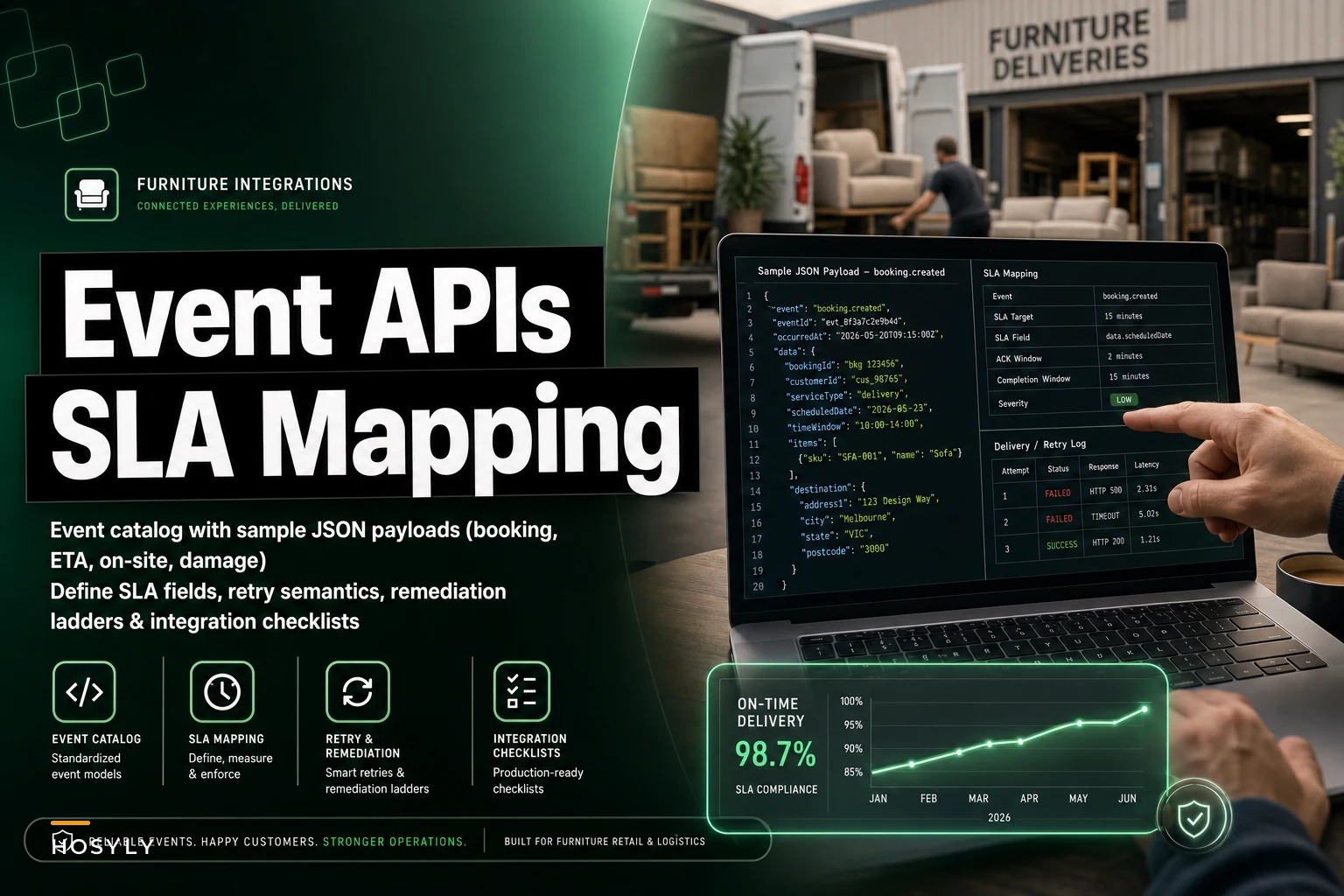
This is a working catalog. Event-by-event payloads, the SLA fields that actually matter, and the retry and remediation rules that keep a missed webhook from turning into a lost weekend for your service desk. The core concern here — building a reliable installer event API for furniture workflows — is really about what you do when reality doesn't match the happy path.
Why furniture installer events are different from parcel tracking
Everyone reaches for the parcel-tracking mental model first, and it breaks almost immediately. A package has maybe six states and one physical object. A furniture install has a crew, a vehicle, a multi-piece order, a customer who may or may not be home, assembly steps, and a real chance something gets damaged during the work you're paying for.
The pattern that keeps showing up: integrations model booking and completion well, then treat everything in between as a single opaque "in progress" blob. That blob is exactly where your SLA breaches, chargebacks, and repeat-visit costs live.
-
Events are multi-object. A single appointment can partially complete — three of four items installed, one damaged. Your payload needs line-item granularity, not just a job-level status.
-
The customer is a dependency. "Customer not home" and "customer refused delivery due to visible damage" are completely different operational outcomes that both look like "failed attempt" if you're not specific.
-
Damage found on-site is a revenue and liability event, not a logistics footnote. It triggers claims, reorders, and sometimes a second install you're paying for.
-
Crews work offline. Basements, rural addresses, dead zones. Events get queued on a device and arrive late or out of order. Your system has to tolerate that.
Keep those four in mind and the catalog below makes more sense.
The core event catalog
Here's the minimal set worth implementing. You can add more, but skip any of these and you'll regret it the first time an install goes sideways.
Eliminate inventory headaches and order delays.
Hosyly streamlines your furniture orders and stock management for seamless store operations.
- Real-time inventory tracking
- Automated order processing
- Customer notifications & engagement
No credit card required
| Event | When it fires | Who emits it | SLA-sensitive? |
|---|---|---|---|
booking.confirmed | Installer accepts the job + slot | Installer | Yes — acceptance clock |
eta.updated | Crew assigned, window narrowed, or ETA shifts | Installer | Yes — notification SLA |
crew.en_route | Crew leaves for the address | Installer | Soft |
job.arrived | Crew on-site, before work starts | Installer | Yes — arrival-window SLA |
job.started | Assembly/install begins | Installer | No |
line.installed | A specific line item is completed | Installer | No (but drives partials) |
damage.reported | Damage found (transit or install) | Installer | Yes — claim-open SLA |
job.completed | All in-scope work done | Installer | Yes — completion SLA |
job.incomplete | Left with open items (reschedule needed) | Installer | Yes — re-book SLA |
job.failed | Could not perform (no-access, refusal, etc.) | Installer | Yes — recovery SLA |
Every event shares a small envelope so your consumer doesn't have to special-case each one.
The shared envelope
{ "eventid": "evt9f3a21", "eventtype": "job.arrived", "occurredat": "2026-02-14T13:42:07Z", "receivedat": "2026-02-14T13:58:50Z", "orderref": "SO-884213", "appointmentref": "APPT-55021", "installerid": "instnorthside", "idempotencykey": "inst_northside:APPT-55021:job.arrived:1", "sequence": 4, "payload": { } }
-
occurredatvsreceivedat. Because crews work offline, the gap between these two is your real signal. If it's 90 minutes, that event sat on a device. Your SLA math must useoccurred_at, not when your server happened to receive it. -
idempotencykey. Installer apps retry. You will get the same event twice. Dedupe on this key, not oneventidalone. -
sequence. Monotonic per appointment. Lets you detect out-of-order and missing events — if you see sequence 6 but never got 5, something's missing.
Booking and ETA payloads
Booking and ETA payloads
Here's the minimal set worth implementing. You can add more, but skip any of these and you'll regret it the first time an install goes sideways.
booking.confirmed
{ "eventtype": "booking.confirmed", "orderref": "SO-884213", "appointmentref": "APPT-55021", "payload": { "scheduledwindow": { "start": "2026-02-14T13:00:00Z", "end": "2026-02-14T16:00:00Z" }, "crewsize": 2, "servicetype": "whitegloveassembly", "lineitems": [ { "lineref": "L1", "sku": "SEC-GRY-3PC", "qty": 1, "requiresassembly": true }, { "lineref": "L2", "sku": "OTT-GRY", "qty": 1, "requiresassembly": false } ], "accessnotes": "3rd floor walk-up, no elevator" } }
That access_notes field looks minor and it's one of the highest-value things in the whole payload. Walk-ups, tight stairwells, and elevator reservations are consistently among the top reasons two-person crews run long or fail outright. If you want the operational side of why crew pairing and site access matter this much, the breakdown on two-person delivery scheduling for bulky furniture covers the routing and pairing logic that feeds directly into what an installer can realistically commit to.
eta.updated
{ "eventtype": "eta.updated", "appointmentref": "APPT-55021", "payload": { "etastart": "2026-02-14T14:15:00Z", "etaend": "2026-02-14T14:45:00Z", "reason": "priorjoboverrun", "confidence": "medium" } }
One mistake that comes up constantly: treating every eta.updated as customer-notifiable. If you forward all of them, you train customers to ignore your texts because they get five in a row. Set a threshold — only notify when the ETA moves outside the originally promised window, or shifts by more than 45 minutes or so. The reason field is for your ops team; confidence is for deciding whether to notify at all. A low confidence shift probably shouldn't hit the customer yet.
On-site events: where partials live
This is where most integrations get it wrong. On-site reality is rarely clean "done" or "not done."
job.arrived
{ "eventtype": "job.arrived", "appointmentref": "APPT-55021", "payload": { "arrivedat": "2026-02-14T14:22:00Z", "withinwindow": false, "customer_present": true } }
line.installed and partial completion
{ "eventtype": "line.installed", "appointmentref": "APPT-55021", "payload": { "line_ref": "L1", "sku": "SEC-GRY-3PC", "status": "installed", "notes": "Assembled and placed per customer direction" } }
Fire one per line item as it's finished. This lets you reconstruct a partial completion without needing a separate "partial" event type.
job.incomplete
{ "eventtype": "job.incomplete", "appointmentref": "APPT-55021", "payload": { "completedlines": ["L1"], "openlines": [ { "lineref": "L2", "reason": "damagedonarrival", "reschedulerequired": true } ], "leftsiteat": "2026-02-14T15:40:00Z", "customer_signature": true } }
This event references a damage reason but doesn't contain the damage detail. That belongs in its own event so your claims flow can consume it independently — which brings us to the one people most often botch.
Damage reports: a revenue event in disguise
A damage.reported event is not a status update. It opens a clock on a claim, may trigger a reorder, and almost always implies a second visit you're financing. Model it that way.
{ "eventtype": "damage.reported", "appointmentref": "APPT-55021", "payload": { "lineref": "L2", "sku": "OTT-GRY", "damagetype": "fabrictear", "attribution": "transit", "severity": "major", "foundphase": "unboxing", "photos": [ { "url": "https://cdn.installer.example/d/88a1.jpg", "sha256": "f1c2...", "capturedat": "2026-02-14T14:51:00Z" } ], "customeracceptsasis": false, "crewremediationattempted": false } }
-
attribution—transit,install,manufacturing, orunknown. This decides who eats the cost. Crews under-reportinstallattribution for obvious reasons, so track the rate and audit it. If one crew's "transit" damage rate is double everyone else's, that's not a supplier problem. -
foundphase— damage found atunboxingis a clean transit claim. Damage found atpostassemblyis murky and harder to recover. The phase changes your odds on the claim significantly.
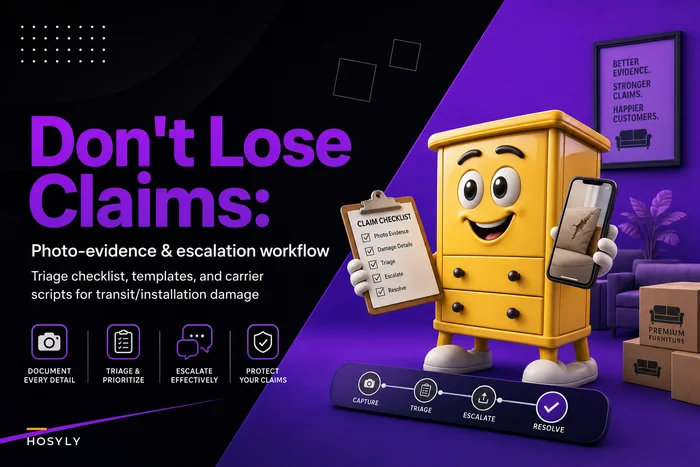
Those photos need to be captured on-site, hashed, and timestamped — not uploaded later from memory. The reason to carry sha256 and captured_at is so your claim survives a carrier dispute. If you haven't formalized how crews capture and escalate damage evidence, the workflow in our guide on a photo-evidence and escalation workflow for furniture transit damage maps almost directly onto these payload fields.
SLA fields and how to map them
SLAs only matter if they're attached to specific events with specific clocks. Here's the mapping that holds up in practice.
| SLA | Start event | Stop event | Typical target | Breach action |
|---|---|---|---|---|
| Acceptance | job offered | booking.confirmed | 4 business hrs | Re-offer to backup installer |
| Arrival window | scheduled_window.start | job.arrived | ±30 min | Customer notify + credit flag |
| ETA notification | eta.updated (out of window) | customer notified | 10 min | Auto-escalate to CSR |
| Completion | job.started | job.completed | per-SKU table | Review for re-book |
| Claim open | damage.reported | claim created | 24 hrs | Auto-open claim draft |
| Re-book | job.incomplete | new booking.confirmed | 48 hrs | Flag to service manager |
Two things worth saying plainly. First, always measure SLAs on occurred_at — an installer shouldn't breach an arrival SLA because their app was offline in a basement for 20 minutes. Second, completion SLA should be a per-SKU table, not a flat number. A nightstand and a modular wall unit are not the same job, and a single global target punishes installers for taking harder work.
Tracking these consistently is also how you build the scorecards that tell you which installers to keep. The vetting and governance side — turning this event data into keep/drop decisions — is covered in how to vet and govern furniture installers to cut liability and repeat installations. The events in this catalog are the raw material for exactly those scorecards.
Retry and error rules that don't lose events
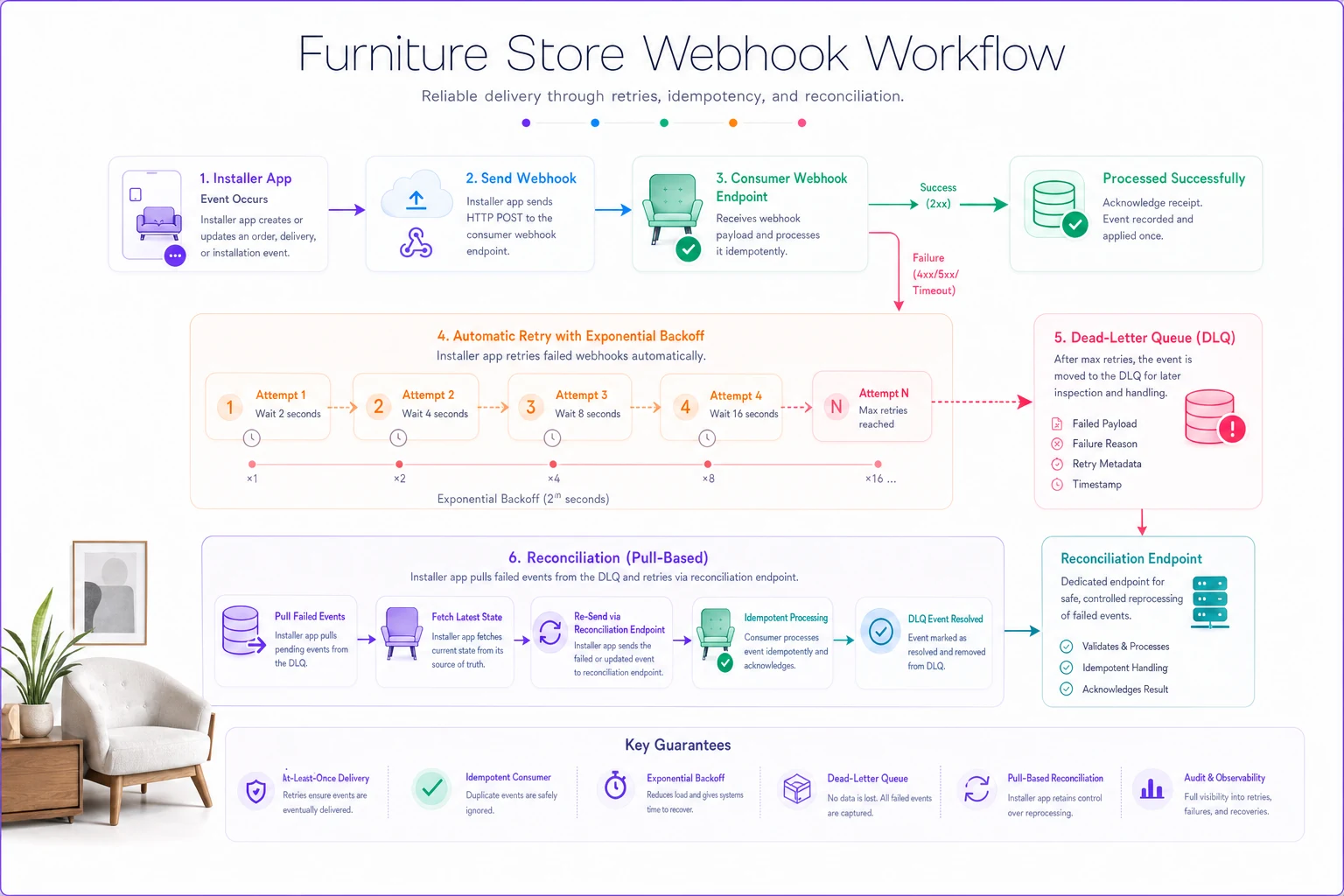
Webhooks fail. Networks blip. Your consumer returns a 500 during a deploy. The question is never if, it's what happens next.
-
Installer retries on any non-2xx with exponential backoff
30s, 2m, 10m, 1h, then hourly up to 24h.
-
Your consumer is idempotent — dedupe on
idempotency_key, so retries are safe and cheap. -
Return 2xx fast. Accept the event, queue it internally, then process. Don't do claim creation inline and risk timing out the installer's webhook. A slow consumer looks like a failing consumer and triggers unnecessary retries.
-
After 24h of failure, the installer drops the event into a dead-letter queue and raises an alert. It does not silently give up.
-
Reconciliation endpoint. Expose
GET /appointments/{ref}/eventsso you can pull the full event history on demand. This is your safety net for anything that fell through webhooks entirely.
That last point is the one teams skip and the one that saves them. Webhooks are push; reconciliation is pull. You need both. A nightly job that pulls event history for any appointment with a gap in its sequence numbers will catch dropped events before a customer does.
A quick diagram of the retry and reconciliation flow.
Detecting the silent gap
-
If
job.startedfired but nojob.completedorjob.incompletewithin the SKU's expected duration plus buffer → flag for CSR follow-up. -
If
booking.confirmedfired but nojob.arrivedwithin 2 hours of window end → flag as possible no-show. -
If
sequenceskips a number → pull from the reconciliation endpoint.
None of this is complicated. It's just the stuff that gets cut when the integration is scoped as "booking and completion" and ships before anyone models the middle.
Remediation flows: what to do on breach
Detecting a breach is worthless without a defined next action. Map each one.
Arrival SLA breach (crew late beyond window): Auto-send customer notification → flag appointment for a goodwill credit review → log against the installer's on-time score. Don't wait for the customer to call.
Damage reported, customer refuses as-is:
Auto-draft a claim from the damage.reported payload → trigger reorder check on the SKU → create a re-book task tied to the reorder ETA, not today's date. The classic mistake is scheduling the return visit before the replacement part is confirmed, which produces a second failed visit.
Job incomplete, open lines:
Within the 48h re-book SLA, the service manager gets the open-lines list with reasons. If the reason is damagedonarrival, it routes to claims first, scheduling second.
No-show detection (confirmed but never arrived): Escalate to the installer's dispatcher within 2 hours of window end. If this is a repeating pattern from one installer, it feeds the governance scorecard.
A short real scenario
A short real scenario
A mid-size retailer running three in-house crews plus one subcontractor network was handling roughly 110–130 installs a week. Their integration tracked booking and completion only — the middle was a black hole. The service desk spent a big chunk of each morning making outbound "where is your install" calls because status was genuinely unknown until the job closed.
Two problems compounded. Damage found on-site got radioed to a dispatcher who maybe logged it, maybe didn't, so claims went in late and a noticeable share got denied for missing the carrier's filing window. Incomplete jobs also got rescheduled immediately — before replacement parts were confirmed — so a frustrating number of second visits failed too.
They added three things: line-item line.installed events for partials, a proper damage.reported event with on-site photo capture and hashing, and a reconciliation pull for any appointment with a sequence gap. Nothing fancy.
Within a couple of months, the morning "where is it" calls dropped off sharply because status was actually flowing in near real time. Late-filed claims became rare, and claim recovery improved enough to show up in the P&L. Repeat failed visits for damaged items fell once re-books were tied to part ETAs instead of same-week optimism. No dramatic overnight transformation — just the middle of the process finally being visible.
When this level of detail is worth it — and when it isn't
It's worth it when you're running mixed crews, doing white-glove assembly, or when install volume is high enough that your service desk is spending real hours chasing status. The partial-completion and damage events pay for themselves the first busy month.
It's probably overkill if you do a handful of installs a week with one trusted crew you can just text. Modeling ten event types and a dead-letter queue for twelve jobs a week is engineering for its own sake. Start with booking, arrival, completion, and damage — add the rest when volume demands it.
Don't build this if you haven't first agreed with the installer on who sends what, and when. The cleanest API in the world is useless if the crew's app only fires job.completed and nothing else. The contract and the operational habit come first; the payloads just encode them.
The thing to get right first
If you take one idea from all of this: model the middle, and measure your SLAs on when things happened, not when your server heard about them. Furniture installs fail in the gap between "accepted" and "done," and that gap stays invisible unless you've deliberately built events to light it up. Partials, on-site damage, and silent missing events are where the money leaks — in denied claims, repeat visits, and a service desk spending its mornings guessing.
Get the event catalog, the SLA clocks, and the retry-plus-reconciliation safety net in place, and your installer integration stops being a source of surprises. Fewer phone calls, cleaner claims, and a crew's bad day showing up in your system while there's still time to do something about it.
If you take one idea from all of this: model the middle, and measure your SLAs on when things happened, not when your server heard about them. Furniture installs fail in the gap between "accepted" and "done," and that gap stays invisible unless you've deliberately built events to light it up. Partials, on-site damage, and silent missing events are where the money leaks — in denied claims, repeat visits, and a service desk spending its mornings guessing.
Get the event catalog, the SLA clocks, and the retry-plus-reconciliation safety net in place, and your installer integration stops being a source of surprises. Fewer phone calls, cleaner claims, and a crew's bad day showing up in your system while there's still time to do something about it.
Ready to elevate your furniture business?
Join 500+ furniture retailers using Hosyly to increase efficiency, improve customer satisfaction, and grow revenue.