

Most furniture retailers treat assembly and care documentation as an afterthought. It's whatever the supplier shipped in the carton, maybe reprinted with your logo on top, maybe a one-page care card written by someone in marketing who's never actually tightened a cam lock. The thinking is: the manual is the manufacturer's problem, and if a customer messes up assembly, that's on them.
Except it isn't. Not when it comes back as a warranty claim, a field repair visit, or a one-star review saying "the drawer fell off after two weeks." A surprising share of what gets logged as product defects are actually assembly defects — errors that better documentation would have prevented entirely.
That's the whole premise here. Documentation isn't paperwork. It's a preventative lever you can pull to bring your repair rate down. Retailers who treat it that way — with video, annotated diagrams, and parts lists built by product archetype — see fewer callbacks, fewer claims, and cleaner installs.
The specific problem: "defects" that aren't defects
Pull a quarter's worth of repair tickets and sort them honestly. You'll usually find three buckets hiding inside what the team calls "quality issues":
-
Genuine manufacturing defects — cracked frame, warped panel, missing hardware from the factory.
-
Transit damage — which is a separate workflow with its own evidence trail (we've covered the photo-evidence and escalation side of transit damage in detail elsewhere).
-
Assembly-induced failures — the drawer slide installed upside down, the cam bolt only half-seated, the sofa leg cross-threaded, the bed rail bracket skipped because the diagram was ambiguous.
That third bucket is the one documentation controls directly. And in a lot of catalogs it's quietly the largest of the three.
Here's a typical pattern. A flat-pack six-drawer dresser gets returned with "drawers don't close." The crew or customer installed the center drawer slides a notch too high because the supplied diagram showed both slides from the same angle, with no indication of orientation. Nothing was wrong with the product. The paperwork failed.
Multiply that across every unit of a high-volume SKU and you've got a repair rate that looks like a product problem but is actually a documentation problem — and you'll keep "fixing" it by swapping units and reordering stock, which fixes nothing.
Why it happens
A few things reliably push assembly errors up, and almost none of them are about the customer being careless.
Eliminate inventory headaches and order delays.
Hosyly streamlines your furniture orders and stock management for seamless store operations.
- Real-time inventory tracking
- Automated order processing
- Customer notifications & engagement
No credit card required
Supplier manuals are optimized for cost, not clarity. Factories print the smallest, cheapest insert that technically lists the steps. Tiny line art, no color, no callouts on the parts that actually cause failures. The steps are present but the failure-prone moments aren't flagged.
One manual gets reused across variants. A supplier ships the same insert for the 3-drawer and 6-drawer version, or for the left-hand and right-hand chaise. The customer follows it literally and ends up with a mirror-image mistake.
Care instructions are generic to the point of useless. "Wipe with a damp cloth" tells a customer nothing about whether their performance-weave fabric can take a water-based cleaner, or whether their oiled-oak table needs re-oiling every six months. The finish degrades. It comes back as a quality complaint.
Nobody owns documentation internally. It falls between merchandising, operations, and whoever answers the phone. When no single person owns doc quality, nothing improves it.
The underlying issue: documentation is created once, at onboarding, and never revisited based on what the repair data is telling you.
Build documentation by archetype, not by SKU
Trying to write custom documentation for every SKU is a trap — you'll never finish, and you shouldn't. The practical move is to document by product archetype, because failure modes repeat within a type far more than they differ between individual SKUs.
| Archetype | Primary failure mode | Documentation priority |
|---|---|---|
| Case goods (dressers, consoles) | Drawer slide orientation, cam bolt seating | Annotated slide diagram + torque/seating note |
| Upholstery (sofas, sectionals) | Leg cross-threading, bracket skipping, misaligned connectors | Short video for connector lock, leg-start diagram |
| Bed frames | Rail bracket omission, center support skipped | Video on center support + weight-rating callout |
| Tables (dining, coffee) | Overtightening, uneven leg leveling | Diagram with sequence + "hand-tight then quarter-turn" note |
| Modular/shelving | Load limits, anti-tip anchor skipped | Anti-tip video + wall-anchor warning |
| Outdoor | Care/finish degradation, hardware corrosion | Care schedule card, not assembly focus |
Focus on the three or four steps that actually break for each archetype rather than rewriting every SKU.
Each archetype has one or two moments that cause the majority of its field failures. You don't need a 40-step rewrite — you need to nail the three or four steps that actually break.
The three-layer documentation standard
For each archetype, aim for three layers that reinforce each other. The redundancy is intentional — people learn differently, and a crew in a hurry will skim.
Layer 1 — Annotated diagrams. Take the supplier's base art and add your own callouts: arrows on orientation, a red circle on the step that causes the most returns, a "STOP — check this" flag before an irreversible step. The annotations should come directly from your repair tickets. If drawer slides are your top case-goods failure, that step gets the biggest, clearest callout.
Layer 2 — Short video. Not a glossy production. Ninety seconds, phone-shot, well-lit, showing the one or two failure-prone steps in real time. The most useful videos show the wrong way first — "if your slide looks like this, it's upside down" — then the right way. Host it, generate a QR code, and print the code on the annotated diagram and the carton.
Layer 3 — Parts list with photos. Every fastener and connector shown at actual size, labeled, and counted. Half of "missing part" complaints are really "I can't tell which bag is which" complaints. A photo parts list kills those immediately.
Here's a sample video spec you can hand off to whoever shoots them:
-
60–120 seconds, landscape, one archetype per video
-
Open by naming the SKU family and the single step most likely to go wrong
-
Show the wrong method, then the correct method, on camera
-
End with the one care instruction that most affects longevity
-
No background music, clear verbal callout of torque/orientation
-
Same intro/outro frame across all videos so they feel like a set
This illustrates the workflow for producing the three-layer documentation and getting it into distribution touchpoints.
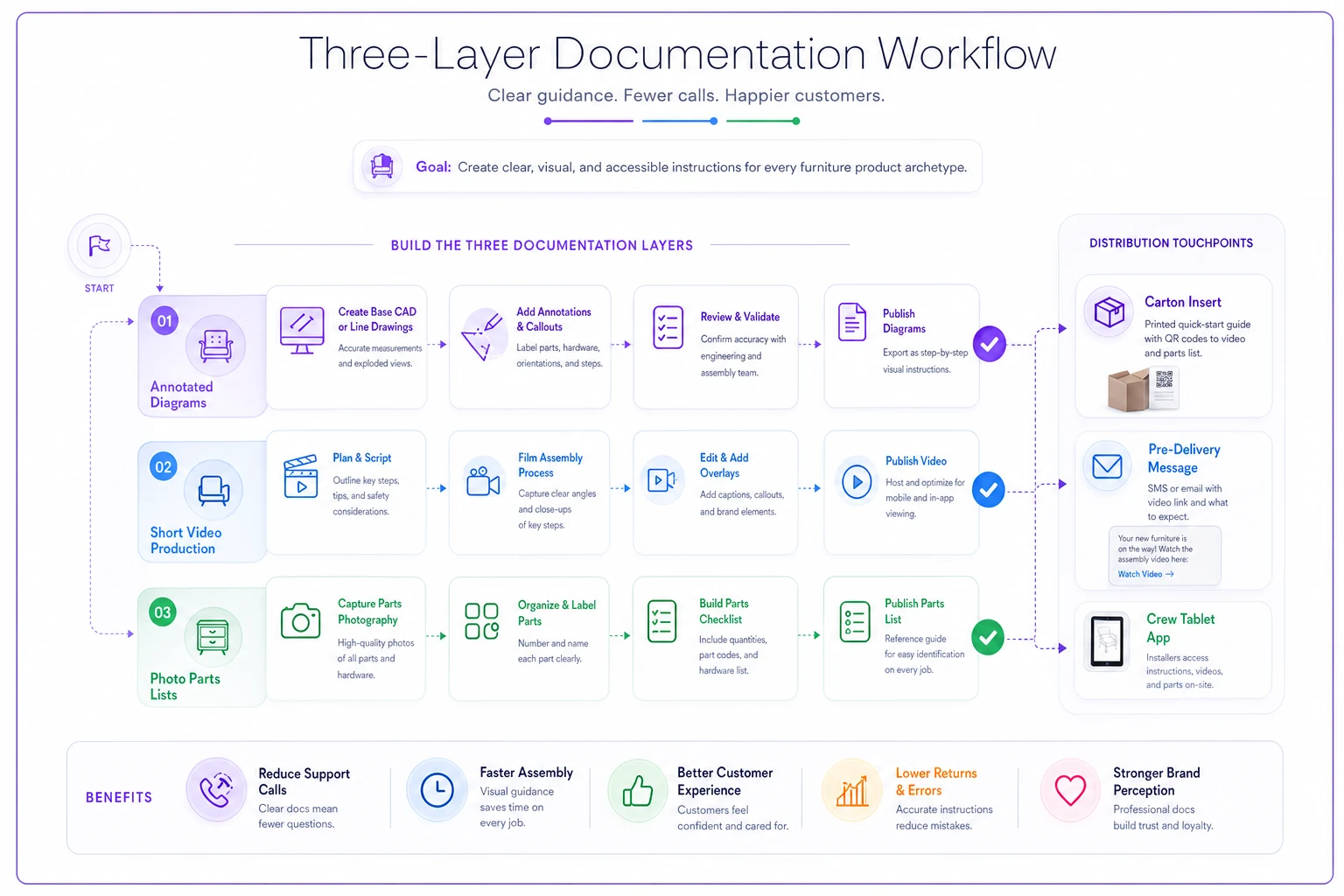
The redundancy is intentional — diagrams, video, and parts photos reinforce the same checks so crews and customers hit the failure-prone steps correctly.
Distribution: documentation nobody sees prevents nothing
This is where most of the effort gets wasted. Retailers build better docs and then bury them in a carton the customer tosses before they start assembling. Documentation only reduces repairs if it reaches the person at the moment of assembly.
-
Carton insert — annotated diagram + QR to video. Printed, in-box, always.
-
Pre-delivery email/SMS — sent the day before delivery or pickup, linking the video. For self-assembly customers especially, watching before the box is open changes the outcome.
-
Crew tablet — your delivery and install crews should pull the same video and parts list on-site. If a two-person crew is handling assembly, the doc lives in their workflow, not just the customer's hands. (If your crew scheduling isn't tight enough for this to stick, that's worth fixing separately — the two-person delivery scheduling mechanics matter here because a rushed, mispaired crew skips documentation steps.)
-
Post-delivery care card — a follow-up message 7–10 days out with the care schedule for that archetype's finish or fabric.
-
Product page — the same video embedded pre-purchase. It sets expectations and reduces "harder to assemble than I thought" returns.
A simple rule that works: every archetype video must appear at a minimum of three touchpoints before it counts as live. Carton + pre-delivery + crew tablet is the floor.
Linking documentation quality to KPIs
If you can't measure it, it'll drift back to afterthought status within a quarter. The point of all this is a lower repair rate, so connect the documentation work directly to repair metrics.
-
Assembly-attributable repair rate — repairs tagged as assembly-induced ÷ units sold, per archetype. This is your north star.
-
"Missing parts" claim rate — a direct proxy for parts-list quality.
-
Video view rate — what share of delivered or self-assembly customers actually watched. A low view rate means a distribution problem, not a content problem.
-
First-time install success — crew installs completed without a callback.
-
Care-related complaints — finish and fabric degradation claims, as a check on care-doc quality.
When you ship improved documentation for an archetype, the assembly-attributable repair rate for that archetype should fall within a few order cycles. If it doesn't move, either the content missed the real failure step or distribution isn't landing. Both are fixable, and the data tells you which.
One honest note: don't expect the overall repair rate to move fast. You'll see movement archetype by archetype, usually on your highest-volume, highest-failure families first. That's exactly where to start.
A real scenario
A mid-size retailer with two showrooms and a growing online side was running an assembly-attributable repair rate around 6–7% on their case-goods line — mostly six-drawer dressers and tall consoles, mostly drawer-slide and cam-bolt issues. Every ticket meant either a crew callback or a swapped unit, and the swaps were eating into stock they couldn't easily reorder.
They didn't rewrite everything. They picked the case-goods archetype, pulled three months of tickets, and found that roughly two out of three repairs traced back to two steps: slide orientation and bolt seating. They re-annotated the existing diagram with clear red callouts on those two steps, shot a single 90-second video showing the upside-down slide mistake, added a photo parts list, and pushed the video to the carton insert, a pre-delivery text, and the product page.
Over the following months, the case-goods assembly repair rate dropped to somewhere around 3–4%. "Missing parts" tickets fell noticeably once the photo parts list went in. Crew callbacks on that line dropped enough to free up install capacity they'd been quietly losing to rework. Total cost: a phone, an afternoon of filming, and someone willing to actually read the repair tickets.
Nothing exotic. The win came from treating one archetype's documentation as a repair-prevention tool and measuring whether it worked.
When this is worth doing — and when it isn't
Worth it when: you carry self-assembly or crew-assembled product in volume, your repair tickets show a meaningful share of assembly-induced failures, and you have enough SKU archetypes to batch the work. If a handful of high-volume families drive most of your callbacks, the ROI is obvious.
Lower priority when: your catalog is mostly fully-assembled, white-glove-only delivery with experienced in-house crews and a genuinely low callback rate. Better documentation still helps on the care side, but the assembly-prevention payoff is smaller.
Who should not start here: if your repair data isn't tagged well enough to separate assembly failures from transit damage and true defects, fix the tagging first. You can't target documentation at failure modes you can't see. Clean ticket categorization is the prerequisite.
Where tooling fits — lightly
None of this requires fancy software to start. A phone, annotated PDFs, and QR codes get you most of the way. Where an operational platform earns its keep is in the loop: tagging repair tickets by cause and archetype, attaching the right documentation version to each SKU family, pushing videos to the correct distribution touchpoints, and surfacing the assembly-attributable repair rate per archetype so you can see whether a doc change actually moved the needle. The manual version of that loop tends to decay — someone leaves, tagging gets sloppy, and you lose the feedback signal that made the whole thing work. Automating the routine parts of that loop is mostly about keeping the discipline alive after the initial push fades.
But the discipline comes first. The software just keeps you honest about it.
The real takeaway
The reason assembly documentation stays an afterthought is that the cost of bad documentation shows up somewhere else on the P&L — in repair labor, swapped stock, and claims — where nobody connects it back to a two-column insert from the factory. Once you start tagging repairs by cause and reading them by archetype, that connection becomes hard to ignore. A handful of failure-prone steps, documented clearly and actually delivered to the person holding the hex key, do more to lower your repair rate than most quality-control effort aimed at the product itself.
Start with your worst-offending archetype. Fix the two steps that break. Get the video to three touchpoints. Then watch that one number move before you touch the next one.
Start with your worst-offending archetype. Fix the two steps that break. Get the video to three touchpoints. Then watch that one number move before you touch the next one.
Ready to elevate your furniture business?
Join 500+ furniture retailers using Hosyly to increase efficiency, improve customer satisfaction, and grow revenue.