

When a small furniture retailer bolts an online channel onto a showroom that's been running fine for years, the first thing that breaks isn't the website. It's the shared inventory pool. You suddenly have a customer on the floor sitting on a sectional while a web order for the same SKU clears somewhere else, and now your salesperson is apologizing for something that was in stock four minutes ago.
The advice you find online for this problem is written for retailers with regional DCs and dozens of stores. That math doesn't survive contact with a two-location store holding maybe 600 unique SKUs and one small back room. When you only have one or two of something, "allocate proportionally across the network" is meaningless. You need holdback rules, demo protections, and transfer timing tuned specifically to single-digit footprints — where a single misallocated unit actually costs you a sale.
This is a narrow post on purpose. It's about the allocation math itself — the percentages, the protection logic, and the transfer timing — with spreadsheets you can rebuild in an afternoon.
Why the standard allocation logic fails at small scale
Big-box allocation assumes the law of large numbers is on your side. If a chain holds 400 units of a dining table across 30 stores, a stockout at one location is annoying but recoverable — a transfer arrives in two days and no single sale was ever really at risk.
At your scale, the numbers are brutal and lumpy. You might have exactly two of a popular accent chair: one on the floor as a demo, one in the back. The moment you list that SKU online with "in stock: 2," you've told the internet you have inventory you can't actually ship without gutting your showroom.
What we've seen across small retailers adding e-commerce is that the failure almost always comes from treating on-hand quantity and sellable quantity as the same number. They aren't. Your sellable-online quantity should almost never equal your physical count when total units are in the single digits per SKU. The gap between those two numbers is your holdback, and getting that gap right is the whole game.
There's a related failure worth naming: retailers set one global rule ("hold back 1 unit of everything") and apply it across every SKU. That over-protects slow movers you'd happily ship and under-protects your hero pieces. The right approach is tiered by how the SKU actually behaves on your floor.
The core holdback formula
Start with the sellable-online quantity for each SKU:
Eliminate inventory headaches and order delays.
Hosyly streamlines your furniture orders and stock management for seamless store operations.
- Real-time inventory tracking
- Automated order processing
- Customer notifications & engagement
No credit card required
``
Sellable Online = On Hand − Floor Demo Units − Safety Holdback − Committed (open orders)
``
The two levers that need tuning are Floor Demo Units and Safety Holdback.
Floor Demo Units is simple: any unit currently displayed on your showroom floor is not sellable online, full stop. Selling the demo out from under a walk-in customer to fulfill a web order is the single fastest way to poison your floor staff's trust in the system. Protect it by default.
Safety Holdback is the judgment call, and it should scale with two things: how fast the SKU sells and how long it takes to replenish. A practical formula for small footprints:
``
Safety Holdback = round_up( (Avg Weekly Units Sold × Replenishment Weeks) × Protection Factor )
``
Where Protection Factor is a small multiplier — usually 0.3 to 0.6 — that reflects how much you value showroom availability over online velocity for that tier.
The point of the Protection Factor is that you don't want to hold your entire lead-time demand. That would zero out online availability on anything popular. You want to hold enough that a normal week of floor traffic doesn't leave you empty-handed while a replenishment is in transit.
A worked allocation example
Take a small two-store retailer. Here's the raw data for four representative SKUs and how the formulas play out:
| SKU | On Hand | Floor Demo | Avg Weekly Sales | Replen Weeks | Protection Factor | Safety Holdback | Committed | **Sellable Online** |
|---|---|---|---|---|---|---|---|---|
| Accent chair (hero) | 6 | 1 | 2.5 | 4 | 0.5 | 5 | 1 | -1 → 0 |
| Sectional (mid) | 4 | 1 | 0.8 | 6 | 0.4 | 2 | 0 | 1 |
| Nightstand (fast/cheap) | 22 | 2 | 6 | 2 | 0.3 | 4 | 3 | 13 |
| Console (slow/high-ticket) | 3 | 1 | 0.3 | 8 | 0.3 | 1 | 0 | 1 |
Look at the accent chair. It's a hero piece — sells 2.5 units a week — but your holdback math wants to protect nearly a month of floor demand. The formula spits out a negative sellable number, which you floor to zero. That's the system correctly telling you: do not list this online right now, you barely have enough for the floor. That's a feature, not a bug.
The nightstand is the opposite. Fast, cheap, quick to replenish — even a modest Protection Factor leaves 13 units freely sellable online. This is exactly the kind of SKU that should carry your early online volume.
The console shows the slow-mover trap. Only three on hand, one on display, sells almost never — but because it's high-ticket and slow to replace, you still hold one back. You're left with a single sellable unit online, which is honest.
The lesson from this table: your online availability should be concentrated in fast, replenishable, lower-ticket SKUs at the start. Hero floor pieces and slow high-ticket items should be protected hardest, even though instinct says "list the popular stuff first."
Setting Protection Factors by tier
Don't set Protection Factor per SKU by hand — you'll never maintain it across hundreds of items. Bucket SKUs into tiers and assign a factor to each:
-
Floor heroes (drive walk-in conversion, high demo dependency)
0.5–0.6
-
High-ticket slow movers (long replenishment, cash tied up)
0.3–0.4, but with a hard minimum holdback of 1
-
Mid-velocity staples
0.4
-
Fast, low-ticket, quick-replen items
0.2–0.3
-
Clearance / discontinued (you want these gone)
0.0 — no holdback, sell everywhere
That clearance line matters. When you're actively trying to move a SKU out, holdback logic works against you. Set it to zero and let both channels drain it. This ties directly into how you sequence markdowns across channels, which we covered in the clearance sequencing breakdown — the allocation rules and the clearance rules have to agree, or you'll end up holding back inventory you're simultaneously trying to dump.
Demo-sample protections that actually hold up
Holdback formulas protect quantity. Demo protection is a different problem — it protects the specific physical unit on your floor from being fulfilled against.
The mistake here is subtle. Retailers correctly exclude the demo from the sellable count, but their system still treats all units as interchangeable. So when a web order comes in for the accent chair and the only remaining unit is the floor model, the pick list happily points someone at the showroom.
Three rules prevent this:
-
Flag demo units as a distinct, non-fulfillable location. Not "on hand minus one" — an actual location bucket ("SHOWROOM-FLOOR") that never appears on a fulfillment pick. This survives edge cases that the subtraction method doesn't.
-
Set a demo replacement trigger, not just a demo protection. When your back-stock of a displayed SKU hits zero, the floor model is now your last unit. That should trigger a reorder alarm and automatically drop the SKU's online availability to zero, because you can no longer sell online without cannibalizing the display.
-
Define a demo-sale exception path. Sometimes you do want to sell the floor model — end of season, discontinuation, a customer who wants that exact piece at a discount. That should be a deliberate, logged action, never an automatic fulfillment. The difference between "we chose to sell the display" and "the system sold our display out from under us" is enormous for floor-staff morale.
To make this concrete: a web order lands for the sectional (sellable online = 1 in our table above). The system reserves the one back-room unit, not the floor demo. Back-room count drops to zero. That triggers two things simultaneously — a replenishment order to the supplier, and an automatic flip of online availability to zero for that SKU. The floor demo stays untouched and sellable to walk-ins. Nobody had to remember to do anything.
Transfer timing between locations
For multi-location small retailers, transfers are where allocation quietly leaks money. The instinct is to transfer as soon as one store shows a stockout. At small scale, that's usually wrong.
Transferring a bulky furniture unit between two showrooms costs real labor and truck time, and it strips a demo or sellable unit from the source store. If you transfer reactively every time, you generate a lot of low-value moves — and sometimes you transfer a unit the source store would have sold the next day anyway.
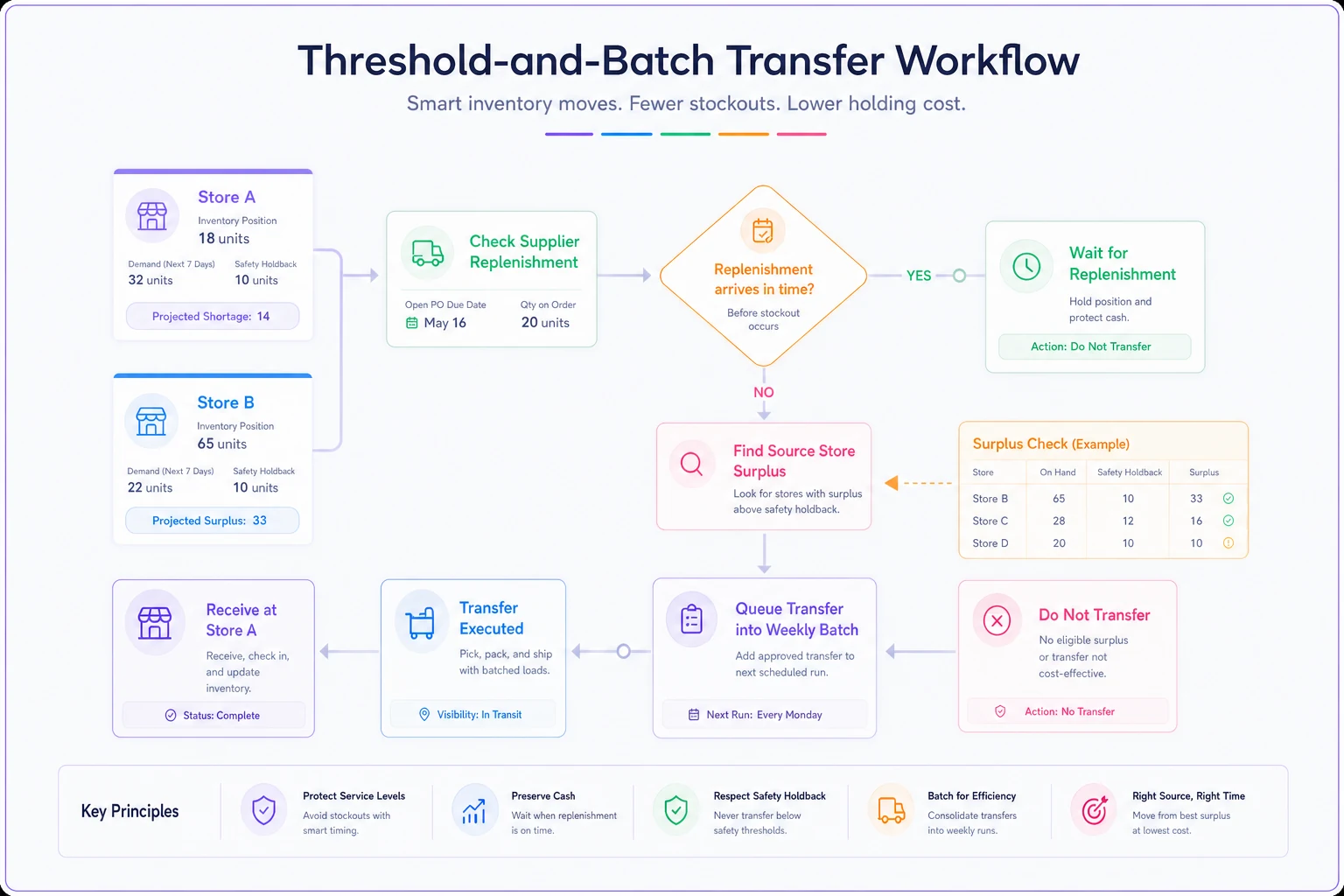
The better approach is threshold-and-batch transfer timing:
-
Don't transfer on a single stockout. Transfer when a location's sellable count hits zero and projected demand over the next replenishment window exceeds what's arriving from the supplier.
-
Batch transfers on a fixed cadence — one inter-store run per week, for example — rather than triggering ad hoc trips. Bulky-item transfer economics reward batching heavily.
-
Never transfer a unit that would drop the source store below its own Safety Holdback. A transfer that fixes one store's stockout by creating another's is a net zero at best and a labor cost at worst.
We break down the broader network logic — when transfers even make sense versus centralizing — in the multi-location allocation strategy post. The transfer timing rules here sit inside that larger framework.
A quick numbered transfer decision process
-
Store B's sellable count for a SKU hits zero.
-
Check incoming supplier replenishment ETA and quantity.
-
If replenishment arrives before projected demand exhausts the pipeline → do nothing, wait for supplier stock.
-
If not, find a source store with surplus above its own Safety Holdback.
-
If a qualifying source exists → queue the transfer for the next batched run, don't dispatch immediately.
-
If no source has surplus above holdback → don't transfer; adjust online availability and flag the SKU for reorder priority.
Step 3 is the one most retailers skip, and it's the one that eliminates the most wasteful moves.
Visualizing that threshold-and-batch decision flow can help align teams on when to move stock and when to wait.
Step 3 is the one most retailers skip, and it's the one that eliminates the most wasteful moves.
A real scenario
A family-run furniture store with two locations added online sales heading into a fall season. Combined they carried around 550 SKUs. In the first six weeks online, they oversold roughly a dozen SKUs — mostly hero accent pieces and a couple of dining sets — because the site listed full physical counts. Each oversell meant a phone call, an apology, and in several cases a canceled order or a scramble to pull the floor demo.
They rebuilt their sellable-online numbers using tiered holdbacks: floor heroes at a 0.5 Protection Factor, fast low-ticket items at 0.25, and a hard demo-location flag so display units never hit a pick list. They also switched from reactive to weekly batched transfers.
Over the following couple of months, online oversells on protected SKUs dropped to near zero. Inter-store transfer trips fell by roughly half because the threshold-and-batch rule killed the low-value reactive moves. The quieter win, according to the owner, was floor-staff trust — sales associates stopped manually checking the back room before every quote because they trusted the sellable number on the screen again.
Nothing about the numbers was dramatic. That's the point. Allocation at small scale isn't a growth lever, it's a leak you stop.
When this level of protection is overkill
Not every small retailer needs the full tiered system.
-
If you carry deep stock (dozens of units per SKU) and short lead times, a flat holdback of one or two units per SKU is fine — the formulas add precision you don't need.
-
If you run a single location with no transfers, skip the transfer section entirely and focus only on holdbacks and demo protection.
-
If your online channel is tiny relative to floor sales — a handful of web orders a week — start with demo protection alone. That's where the sharpest pain is. Add holdback tiers only once online volume is actually competing with the floor for units.
The retailers who genuinely need all three pieces — tiered holdbacks, demo location flags, and batched transfer timing — are the ones with shallow stock on hero SKUs, long-ish replenishment cycles, and an online channel that's grown big enough to threaten floor availability. That's a specific profile, and if it's yours, the spreadsheet math above is worth an afternoon to set up.
Keeping the numbers current
The formulas are only as good as the inputs. Average weekly sales drifts, lead times change with suppliers, and Protection Factors need seasonal adjustment — a factor that's fine in March is probably too low heading into your busiest quarter. Reviewing inputs monthly is enough for most single-digit-footprint stores.
Review inputs monthly to keep holdbacks aligned with current demand.
The failure mode to watch for is a set-and-forget spreadsheet: holdbacks calibrated in a slow month that quietly starve your online channel during a fast one, or factors that were right at peak and now over-list during a lull. If your inventory system can recompute sellable-online quantities from live sales velocity and current on-hand rather than a static column you update by hand, you'll avoid the slow drift that makes these rules stale. Even a manually maintained sheet reviewed monthly beats listing raw physical counts online — which is where most stores start, and where the oversells come from.
Multi-tier allocation for a small furniture retailer isn't about sophisticated network optimization. It's about honestly separating what you can ship from what you physically have, protecting the units that sell your floor, and moving inventory between stores only when the move actually pays for itself.
Ready to elevate your furniture business?
Join 500+ furniture retailers using Hosyly to increase efficiency, improve customer satisfaction, and grow revenue.